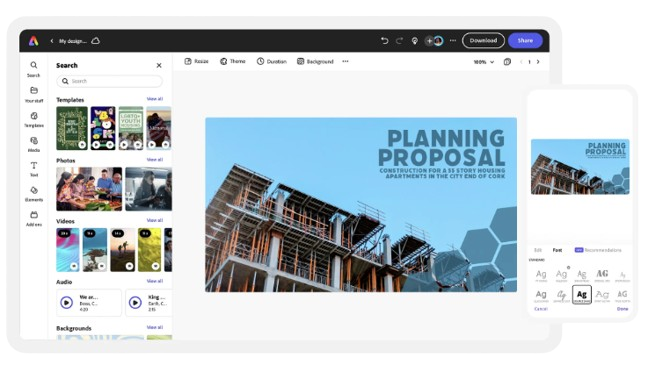
Want to make class presentations less yawns-and-blank-stares and more “I-ca n’t-wait-to-present”? Gamifying class presentations—adding game-like mechanics such as points, challenges, badges, and leaderboards—combined with AI-powered presentation tools can transform passive slide-reading into active learning. If you’re curious where to start, the Adobe Express AI presentation maker is one AI option that gives teachers and students fast design help, templates, and media-generation features to support more interactive, game-style slides.
Why gamify presentations? The evidence (short and sweet)
Research shows gamification can boost engagement, motivation, and measurable learning outcomes. Meta-analyses and systematic reviews report gains in success rates and average grades when game elements are thoughtfully applied—one review found overall improvements (for example, an average success-rate bump around 14% in some courses), and multiple education journals link gamification to stronger participation and retention. In short: game elements help—when used with purpose.
How AI tools make gamified presentations easier
AI presentation makers (from Adobe Express and Canva to Beautiful.ai, Gamma, and SlidesAI) remove the heavy lifting of layout, image creation, and slide sequencing. That means more time to design the gameplay of your lesson—quizzes, branching scenarios, timed challenges, and instant feedback loops—rather than fussing over font sizes or image alignment. These platforms can auto-generate slide copy, produce custom images from prompts, and convert documents into ready-to-edit decks—handy when you want to focus on pedagogy instead of PowerPoint headaches.
Four practical ways to gamify presentations with AI — step-by-step
1) Turn slides into quick micro-challenges
Create 2–3 short challenges per presentation (pop-quiz, mini-puzzle, or prediction). Use AI to generate multiple-choice question options and distractors that match your learning objectives. Ask teams to submit answers in chat or on a shared doc; award points for accuracy plus speed. Tools like SlidesAI or the Adobe Express generator can turn your text into crisp question slides in seconds.
Actionable tip: keep challenges under 90 seconds each and make scoring transparent (e.g., correct = 10 pts, creative answer = 5 pts).
2) Use branching scenarios for decision-based learning
Build “choose-your-path” slides where students pick a route and see consequences on the next slide. AI can help write plausible scenario outcomes and design clean slides for each branch. Branching encourages critical thinking and gives immediate cause-and-effect feedback—great for history, ethics, business case studies, or lab decision-making.
Actionable tip: limit branches to 2–3 to avoid slide bloat; map the flow first on paper or a whiteboard, then let the AI generate slides from your prompts.
3) Layer instant feedback with polls and badges
Pair AI-generated content with polling tools (Google Forms, Mentimeter, or built-in polling features in some platforms). After each poll, reveal a leaderboard or award digital badges made with the AI image generator—visual rewards increase motivation and create social recognition.
Actionable tip: use small, frequent badges (e.g., “Curiosity Kid,” “Speed Solver”) instead of one “big prize” to sustain engagement.
4) Make collaboration a mini-game
Divide students into teams and assign roles (researcher, presenter, designer, fact-checker). Give teams time-limited tasks—e.g., create a 2-slide case study in 15 minutes using an AI slide generator. AI levels the playing field: students with weaker design skills can still produce polished slides quickly, so assessment can focus on content and reasoning.
Actionable tip: rotate roles each session so every student practices multiple skills.
Design principles to avoid gamification gone wrong
- Purpose over points. Use game mechanics to reinforce learning objectives, not just to entertain.
- Equity matters. Ensure access to devices and stable internet; offer low-tech alternatives (printed cards, offline timers).
- Privacy & consent. If using external AI or cloud tools, check data policies and obtain parent/administrator consent when needed.
- Balance competition with collaboration. Overemphasis on leaderboards can demotivate some learners—mix cooperative tasks with competitive ones.
Quick rubric for assessing gamified presentations
- Content accuracy (40%) — Is the subject matter correct and referenced?
- Engagement design (20%) — Do the game elements actively involve peers?
- Clarity of communication (20%) — Are slides concise and readable?
- Reflection (20%) — Did the team include a 1–2 slide reflection on what they learned and why choices mattered?
Final notes and next steps
Gamifying class presentations with AI tools is low-friction and high-impact when you start small: add one micro-challenge per lesson, introduce badges, or try a single branching scenario. Track the effects—attendance, quiz scores, and student feedback—so you can iterate. The research is clear that gamified learning often increases engagement and measurable outcomes, but success depends on thoughtful design, equity, and clear goals.
Want a ready-to-use checklist or a template for a gamified 10-minute presentation? Tell me your grade level and subject and I’ll draft one you can drop into an AI presentation maker and run in class tomorrow.